白皮书下载
Mouse drag
1、 Video example
To be launched.
2、 Function description
Press and hold the mouse to drag from one coordinate point to another; You can drag and drop similar files.
3、 Attribute description
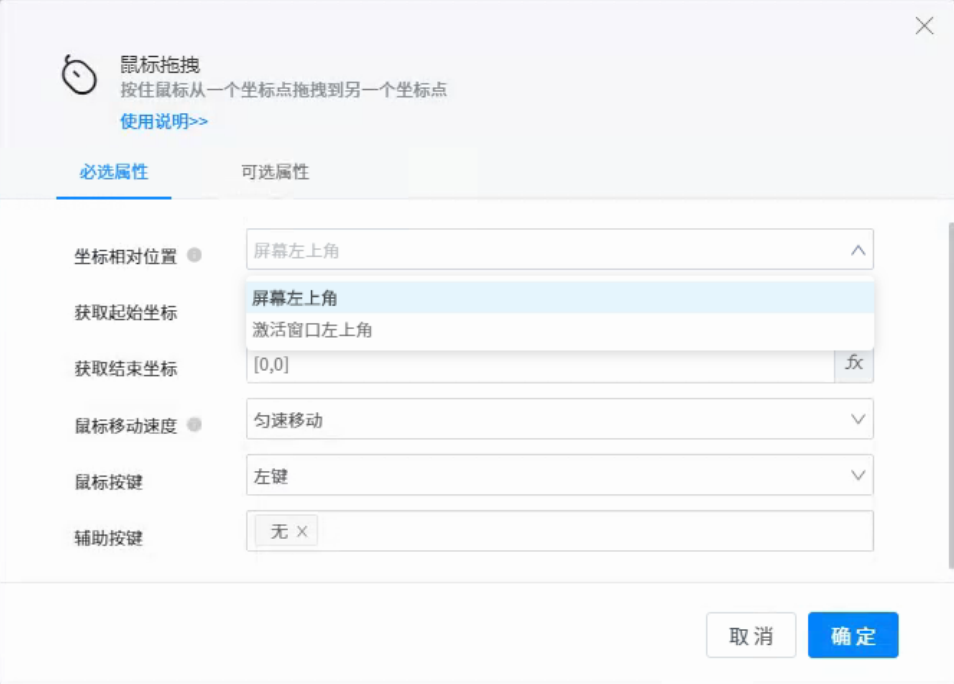
●Coordinate relative position: the upper left corner of the screen. The obtained coordinates are relative to the upper left corner of the whole screen. Activate the upper left corner of the window, and the obtained coordinate position is the position of the upper left corner of the current active window.
●Get start coordinates: obtain the coordinates [x, y] of the mouse on the screen, or enter them manually. (pay attention to the resolution of the device. If the coordinate position exceeds the screen boundary value, the mouse will move the screen edge position)
●Get end coordinates: obtain the coordinates [x, y] of the mouse on the screen, or enter them manually (pay attention to the resolution of the device. If the coordinate position exceeds the screen boundary value, the mouse will move the screen edge position).
●Mouse button: left button. Select left button to execute the function of left mouse button. Right click and select right button to execute the function of right mouse button. Middle button: select the middle button to perform the function of the middle button of the mouse.
●Auxiliary key: (common keyboard keys)
None: the default value is none, which means that the keyboard has no operation
ALT: simulate the keyboard and press the ALT key to cooperate with the mouse for combined operation.
CTRL: simulate the keyboard, press the CTRL key, and cooperate with the mouse for combined operation.
Shift: simulate the keyboard and press the shift key to cooperate with the mouse for combined operation.
Win: simulate the keyboard, press the win key, and cooperate with the mouse for combined operation.
4、 Use example
After adding components, click the button to obtain mouse coordinates. After obtaining coordinates successfully, the coordinate information will appear in the obtained coordinates box in the right property bar; You can also enter coordinate information directly in the attribute area.
Click Run, and the mouse will move from the start coordinate to the end coordinate at a uniform speed.